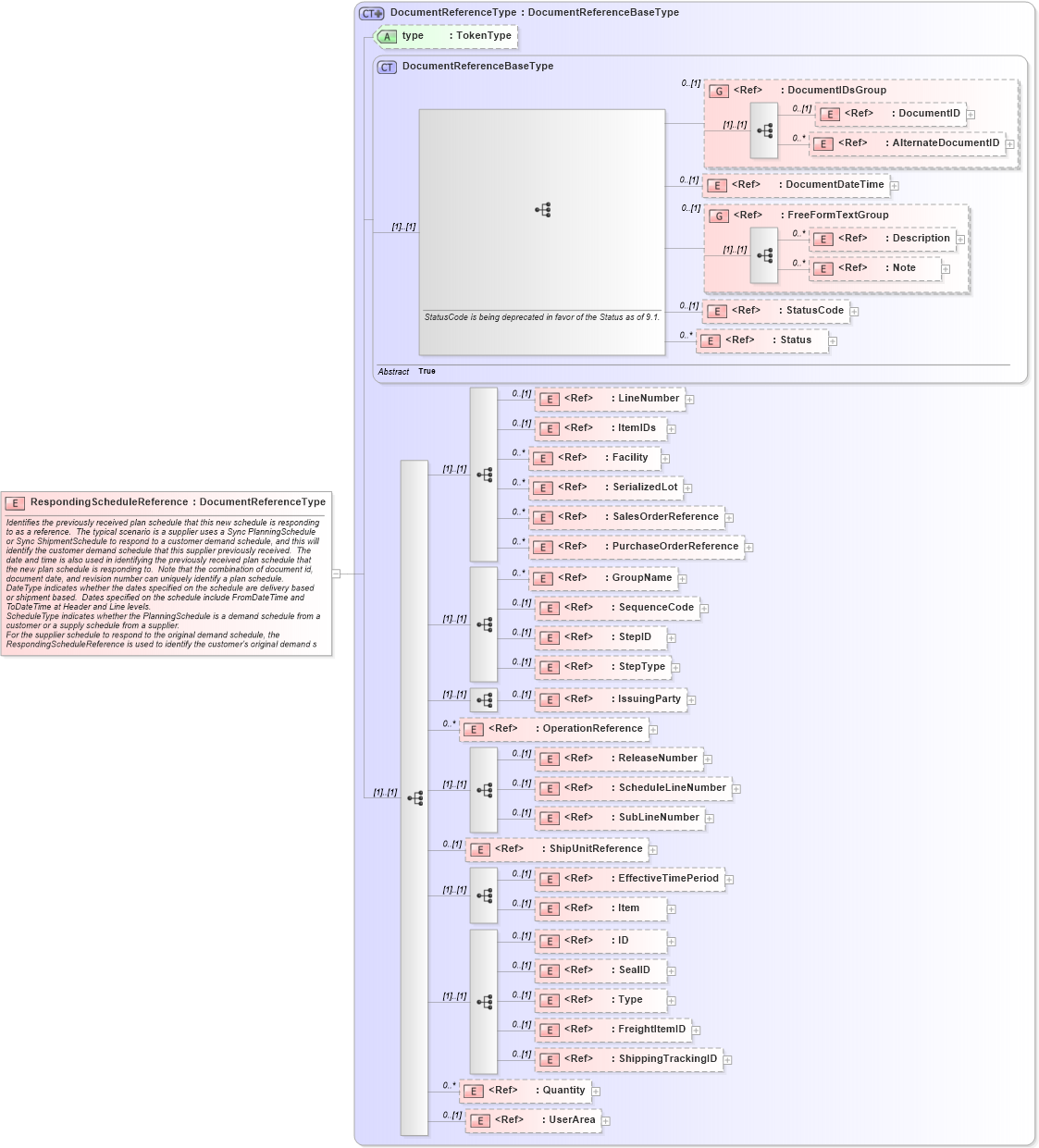
Definition Type: Element
Name: RespondingScheduleReference
Namespace: http://www.openapplications.org/oagis/9
Type: oa:DocumentReferenceType
Containing Schema: ManufacturingComponents.xsd
Abstract
Documentation:
Identifies the previously received plan schedule that this new schedule is responding to as a reference. The typical scenario is a supplier uses a Sync PlanningSchedule or Sync ShipmentSchedule to respond to a customer demand schedule, and this will identify the customer demand schedule that this supplier previously received. The date and time is also used in identifying the previously received plan schedule that the new plan schedule is responding to. Note that the combination of document id, document date, and revision number can uniquely identify a plan schedule. DateType indicates whether the dates specified on the schedule are delivery based or shipment based. Dates specified on the schedule include FromDateTime and ToDateTime at Header and Line levels. ScheduleType indicates whether the PlanningSchedule is a demand schedule from a customer or a supply schedule from a supplier. For the supplier schedule to respond to the original demand schedule, the RespondingScheduleReference is used to identify the customer's original demand schedule that it is responding to.
Collapse XSD Schema Diagram:
Drilldown into UserArea in schema fields_xsd1 Drilldown into Quantity in schema fields_xsd1 Drilldown into ShippingTrackingID in schema fields_xsd1 Drilldown into FreightItemID in schema fields_xsd1 Drilldown into Type in schema fields_xsd1 Drilldown into SealID in schema fields_xsd1 Drilldown into ID in schema fields_xsd1 Drilldown into Item in schema components_xsd1 Drilldown into EffectiveTimePeriod in schema components_xsd1 Drilldown into ShipUnitReference in schema components_xsd1 Drilldown into SubLineNumber in schema fields_xsd1 Drilldown into ScheduleLineNumber in schema fields_xsd1 Drilldown into ReleaseNumber in schema fields_xsd1 Drilldown into OperationReference in schema components_xsd1 Drilldown into IssuingParty in schema components_xsd1 Drilldown into StepType in schema fields_xsd1 Drilldown into StepID in schema fields_xsd1 Drilldown into SequenceCode in schema fields_xsd1 Drilldown into GroupName in schema fields_xsd1 Drilldown into PurchaseOrderReference in schema components_xsd1 Drilldown into SalesOrderReference in schema components_xsd1 Drilldown into SerializedLot in schema components_xsd1 Drilldown into Facility in schema components_xsd1 Drilldown into ItemIDs in schema components_xsd1 Drilldown into LineNumber in schema fields_xsd1 Drilldown into Status in schema components_xsd1 Drilldown into StatusCode in schema fields_xsd1 Drilldown into Note in schema fields_xsd1 Drilldown into Description in schema fields_xsd1 Drilldown into FreeFormTextGroup in schema meta_xsd Drilldown into DocumentDateTime in schema fields_xsd1 Drilldown into AlternateDocumentID in schema components_xsd1 Drilldown into DocumentID in schema components_xsd1 Drilldown into DocumentIDsGroup in schema components_xsd1 Drilldown into DocumentReferenceBaseType in schema components_xsd1 Drilldown into type in schema components_xsd1 Drilldown into DocumentReferenceType in schema components_xsd1XSD Diagram of RespondingScheduleReference in schema manufacturingcomponents_xsd (HR-XML - Human Resources XML)
Collapse XSD Schema Code:
<xsd:element name="RespondingScheduleReference" type="DocumentReferenceType">
    <xsd:annotation>
        <xsd:documentation source="http://www.openapplications.org/platform/1">Identifies the previously received plan schedule that this new schedule is responding to as a reference.  The typical scenario is a supplier uses a Sync PlanningSchedule or Sync ShipmentSchedule to respond to a customer demand schedule, and this will identify the customer demand schedule that this supplier previously received.  The date and time is also used in identifying the previously received plan schedule that the new plan schedule is responding to.  Note that the combination of document id, document date, and revision number can uniquely identify a plan schedule.</xsd:documentation>
        <xsd:documentation source="http://www.openapplications.org/platform/1">DateType indicates whether the dates specified on the schedule are delivery based or shipment based.  Dates specified on the schedule include FromDateTime and ToDateTime at Header and Line levels.
ScheduleType indicates whether the PlanningSchedule is a demand schedule from a customer or a supply schedule from a supplier.
For the supplier schedule to respond to the original demand schedule, the RespondingScheduleReference is used to identify the customer's original demand schedule that it is responding to.
</xsd:documentation>
    </xsd:annotation>
</xsd:element>
Collapse Child Elements:
Name Type Min Occurs Max Occurs
DocumentID oa:DocumentID 0 (1)
AlternateDocumentID oa:AlternateDocumentID 0 unbounded
DocumentDateTime oa:DocumentDateTime 0 (1)
Description oa:Description 0 unbounded
Note oa:Note 0 unbounded
StatusCode oa:StatusCode 0 (1)
Status oa:Status 0 unbounded
LineNumber oa:LineNumber 0 (1)
ItemIDs oa:ItemIDs 0 (1)
Facility oa:Facility 0 unbounded
SerializedLot oa:SerializedLot 0 unbounded
SalesOrderReference oa:SalesOrderReference 0 unbounded
PurchaseOrderReference oa:PurchaseOrderReference 0 unbounded
GroupName oa:GroupName 0 unbounded
SequenceCode oa:SequenceCode 0 (1)
StepID oa:StepID 0 (1)
StepType oa:StepType 0 (1)
IssuingParty oa:IssuingParty 0 (1)
OperationReference oa:OperationReference 0 unbounded
ReleaseNumber oa:ReleaseNumber 0 (1)
ScheduleLineNumber oa:ScheduleLineNumber 0 (1)
SubLineNumber oa:SubLineNumber 0 (1)
ShipUnitReference oa:ShipUnitReference 0 (1)
EffectiveTimePeriod oa:EffectiveTimePeriod 0 (1)
Item oa:Item 0 (1)
ID oa:ID 0 (1)
SealID oa:SealID 0 (1)
Type oa:Type 0 (1)
FreightItemID oa:FreightItemID 0 (1)
ShippingTrackingID oa:ShippingTrackingID 0 (1)
Quantity oa:Quantity 0 unbounded
UserArea oa:UserArea 0 (1)
<xs:group> oa:DocumentIDsGroup 0 (1)
<xs:group> oa:FreeFormTextGroup 0 (1)
Collapse Child Attributes:
Name Type Default Value Use
type oa:type (Optional)
Collapse Derivation Tree: