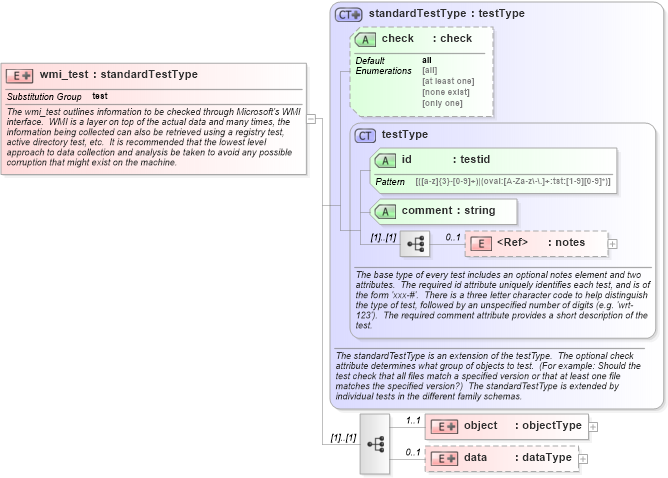
<xsd:element name="wmi_test" substitutionGroup="oval:test">
    <xsd:annotation>
        <xsd:documentation>The wmi_test outlines information to be checked through Microsoft's WMI interface.  WMI is a layer on top of the actual data and many times, the information being collected can also be retrieved using a registry test, active directory test, etc.  It is recommended that the lowest level approach to data collection and analysis be taken to avoid any possible corruption that might exist on the machine.</xsd:documentation>
        <xsd:appinfo>
            <test_name>WMI Test</test_name>
            <extends>standardTestType</extends>
            <valid_sections>notes, object, data</valid_sections>
            <example>
                <wmi_test id="wwt-0" check="at least one" comment="correct permission is assigned" xmlns="http://oval.mitre.org/XMLSchema/oval#windows">
                    <oval:notes xmlns:oval="http://oval.mitre.org/XMLSchema/oval">
                        <oval:note>This is an example test written under version 4 of the OVAL schema.  It is meant to give a short overview of the test and might not contain every possible child element.</oval:note>
                    </oval:notes>
                    <object>
                        <namespace operator="pattern match">^root\\sms\\site_.*\\SMS_SiteControlItem$</namespace>
                        <wql>SELECT SMS_Query.name FROM SMS_UserInstancePermissionNames, SMS_Query WHERE SMS_UserInstancePermissionNames.instancekey = SMS_query.queryid AND SMS_UserInstancePermissionNames.objectkey = 7</wql>
                    </object>
                    <data>
                        <result datatype="string" operator="equals">Fred</result>
                    </data>
                </wmi_test>
            </example>
        </xsd:appinfo>
    </xsd:annotation>
    <xsd:complexType>
        <xsd:complexContent>
            <xsd:extension base="oval:standardTestType">
                <xsd:sequence>
                    <xsd:element name="object" minOccurs="1" maxOccurs="1">
                        <xsd:complexType>
                            <xsd:complexContent>
                                <xsd:extension base="oval:objectType">
                                    <xsd:sequence>
                                        <xsd:element name="namespace" type="oval:subtestStringType" minOccurs="1" maxOccurs="1">
                                            <xsd:annotation>
                                                <xsd:documentation>Specifies which WMI namespace to look under.  Each WMI provider normally registers its own WMI namespace and then all its classes within that namespace. For example, all Win32 WMI classes can be found in the namespace "root\cimv2", all IIS WMI classes can be found at "root\microsoftiisv2", and all LDAP WMI classes can be found at "root\directory\ldap".</xsd:documentation>
                                                <xsd:appinfo>
                                                    <parent_test>WMI Test</parent_test>
                                                    <cardinality>1</cardinality>
                                                    <content>string</content>
                                                    <valid_datatypes>string</valid_datatypes>
                                                    <valid_operators>equals, not equal, pattern match</valid_operators>
                                                </xsd:appinfo>
                                            </xsd:annotation>
                                        </xsd:element>
                                        <xsd:element name="wql" type="oval:subtestStringType" minOccurs="1" maxOccurs="1">
                                            <xsd:annotation>
                                                <xsd:documentation>A WQL query used to identify the object(s) to test against.  Any valid WQL query is usable with one exception, at most one field is allowed in the SELECT portion of the query.  For example SELECT name FROM ... is valid, as is SELECT 'true' FROM ..., but SELECT name, number FROM ... is not valid.  This is because the result element in the data section is only designed to work against a single field.</xsd:documentation>
                                                <xsd:appinfo>
                                                    <parent_test>WMI Test</parent_test>
                                                    <cardinality>1</cardinality>
                                                    <content>string</content>
                                                    <valid_datatypes>string</valid_datatypes>
                                                    <valid_operators>equals, not equal, pattern match</valid_operators>
                                                </xsd:appinfo>
                                            </xsd:annotation>
                                        </xsd:element>
                                    </xsd:sequence>
                                </xsd:extension>
                            </xsd:complexContent>
                        </xsd:complexType>
                    </xsd:element>
                    <xsd:element name="data" minOccurs="0" maxOccurs="1">
                        <xsd:complexType>
                            <xsd:complexContent>
                                <xsd:extension base="oval:dataType">
                                    <xsd:sequence>
                                        <xsd:element name="result" type="oval:subtestStringType" minOccurs="0" maxOccurs="1">
                                            <xsd:annotation>
                                                <xsd:documentation>The result element specifies how to test objects in the result set of the specified WQL statement.  Only one comparable field is allowed.  So if the WQL statement look like 'SELECT name FROM ...', then a result element with a value of 'Fred' would test that value against the names returned by the WQL statement.</xsd:documentation>
                                                <xsd:appinfo>
                                                    <parent_test>WMI Test</parent_test>
                                                    <cardinality>0-1</cardinality>
                                                    <content>string</content>
                                                    <valid_datatypes>binary, boolean, float, int, string</valid_datatypes>
                                                    <valid_operators>equals, not equal, greater than, less than, greater than or equal, less than or equal, bitwise and, bitwise or, pattern match</valid_operators>
                                                </xsd:appinfo>
                                            </xsd:annotation>
                                        </xsd:element>
                                    </xsd:sequence>
                                </xsd:extension>
                            </xsd:complexContent>
                        </xsd:complexType>
                    </xsd:element>
                </xsd:sequence>
            </xsd:extension>
        </xsd:complexContent>
    </xsd:complexType>
</xsd:element>
|
 XSD Schema Diagram: