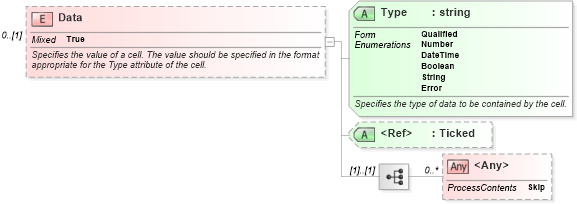
<xsd:element name="Data" minOccurs="0">
    <xsd:annotation>
        <xsd:documentation>Specifies the value of a cell. The value should be specified in the format appropriate for the Type attribute of the cell.</xsd:documentation>
    </xsd:annotation>
    <xsd:complexType mixed="true">
        <xsd:sequence>
            <xsd:any processContents="skip" minOccurs="0" maxOccurs="unbounded" />
        </xsd:sequence>
        <xsd:attribute form="qualified" name="Type" use="required">
            <xsd:annotation>
                <xsd:documentation>Specifies the type of data to be contained by the cell.</xsd:documentation>
            </xsd:annotation>
            <xsd:simpleType>
                <xsd:restriction base="xsd:string">
                    <xsd:enumeration value="Number" />
                    <xsd:enumeration value="DateTime" />
                    <xsd:enumeration value="Boolean" />
                    <xsd:enumeration value="String" />
                    <xsd:enumeration value="Error" />
                </xsd:restriction>
            </xsd:simpleType>
        </xsd:attribute>
        <xsd:attribute ref="x:Ticked" />
    </xsd:complexType>
</xsd:element>
|
 XSD Schema Diagram: