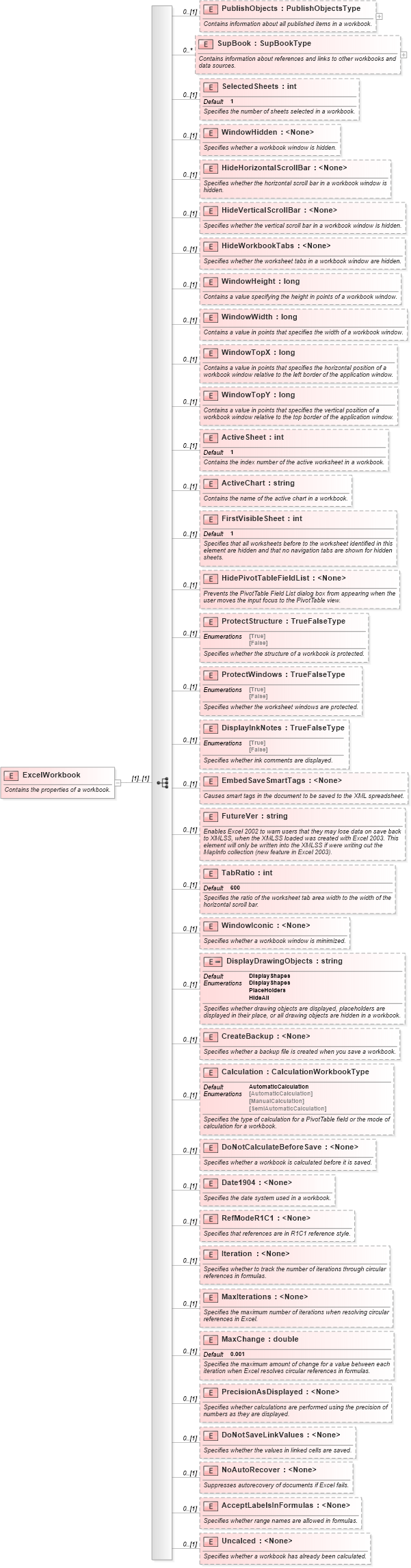
<xsd:element name="ExcelWorkbook">
    <xsd:annotation>
        <xsd:documentation>Contains the properties of a workbook.</xsd:documentation>
    </xsd:annotation>
    <xsd:complexType>
        <xsd:sequence>
            <xsd:element name="PublishObjects" type="PublishObjectsType" minOccurs="0">
                <xsd:annotation>
                    <xsd:documentation>Contains information about all published items in a workbook.</xsd:documentation>
                </xsd:annotation>
            </xsd:element>
            <xsd:element name="SupBook" type="SupBookType" minOccurs="0" maxOccurs="unbounded">
                <xsd:annotation>
                    <xsd:documentation>Contains information about references and links to other workbooks and data sources.</xsd:documentation>
                </xsd:annotation>
            </xsd:element>
            <xsd:element name="SelectedSheets" type="xsd:int" default="1" minOccurs="0">
                <xsd:annotation>
                    <xsd:documentation>Specifies the number of sheets selected in a workbook.</xsd:documentation>
                </xsd:annotation>
            </xsd:element>
            <xsd:element name="WindowHidden" minOccurs="0">
                <xsd:annotation>
                    <xsd:documentation>Specifies whether a workbook window is hidden.</xsd:documentation>
                </xsd:annotation>
            </xsd:element>
            <xsd:element name="HideHorizontalScrollBar" minOccurs="0">
                <xsd:annotation>
                    <xsd:documentation>Specifies whether the horizontal scroll bar in a workbook window is hidden.</xsd:documentation>
                </xsd:annotation>
            </xsd:element>
            <xsd:element name="HideVerticalScrollBar" minOccurs="0">
                <xsd:annotation>
                    <xsd:documentation>Specifies whether the vertical scroll bar in a workbook window is hidden.</xsd:documentation>
                </xsd:annotation>
            </xsd:element>
            <xsd:element name="HideWorkbookTabs" minOccurs="0">
                <xsd:annotation>
                    <xsd:documentation>Specifies whether the worksheet tabs in a workbook window are hidden.</xsd:documentation>
                </xsd:annotation>
            </xsd:element>
            <xsd:element name="WindowHeight" type="xsd:long" minOccurs="0">
                <xsd:annotation>
                    <xsd:documentation>Contains a value specifying the height in points of a workbook window.</xsd:documentation>
                </xsd:annotation>
            </xsd:element>
            <xsd:element name="WindowWidth" type="xsd:long" minOccurs="0">
                <xsd:annotation>
                    <xsd:documentation>Contains a value in points that specifies the width of a workbook window.</xsd:documentation>
                </xsd:annotation>
            </xsd:element>
            <xsd:element name="WindowTopX" type="xsd:long" minOccurs="0">
                <xsd:annotation>
                    <xsd:documentation>Contains a value in points that specifies the horizontal position of a workbook window relative to the left border of the application window.</xsd:documentation>
                </xsd:annotation>
            </xsd:element>
            <xsd:element name="WindowTopY" type="xsd:long" minOccurs="0">
                <xsd:annotation>
                    <xsd:documentation>Contains a value in points that specifies the vertical position of a workbook window relative to the top border of the application window.</xsd:documentation>
                </xsd:annotation>
            </xsd:element>
            <xsd:element name="ActiveSheet" type="xsd:int" default="1" minOccurs="0">
                <xsd:annotation>
                    <xsd:documentation>Contains the index number of the active worksheet in a workbook.</xsd:documentation>
                </xsd:annotation>
            </xsd:element>
            <xsd:element name="ActiveChart" type="xsd:string" minOccurs="0">
                <xsd:annotation>
                    <xsd:documentation>Contains the name of the active chart in a workbook.</xsd:documentation>
                </xsd:annotation>
            </xsd:element>
            <xsd:element name="FirstVisibleSheet" type="xsd:int" default="1" minOccurs="0">
                <xsd:annotation>
                    <xsd:documentation>Specifies that all worksheets before to the worksheet identified in this element are hidden and that no navigation tabs are shown for hidden sheets.</xsd:documentation>
                </xsd:annotation>
            </xsd:element>
            <xsd:element name="HidePivotTableFieldList" minOccurs="0">
                <xsd:annotation>
                    <xsd:documentation>Prevents the PivotTable Field List dialog box from appearing when the user moves the input focus to the PivotTable view.</xsd:documentation>
                </xsd:annotation>
            </xsd:element>
            <xsd:element name="ProtectStructure" type="TrueFalseType" minOccurs="0">
                <xsd:annotation>
                    <xsd:documentation>Specifies whether the structure of a workbook is protected.</xsd:documentation>
                </xsd:annotation>
            </xsd:element>
            <xsd:element name="ProtectWindows" type="TrueFalseType" minOccurs="0">
                <xsd:annotation>
                    <xsd:documentation>Specifies whether the worksheet windows are protected.</xsd:documentation>
                </xsd:annotation>
            </xsd:element>
            <xsd:element name="DisplayInkNotes" type="TrueFalseType" minOccurs="0">
                <xsd:annotation>
                    <xsd:documentation>Specifies whether ink comments are displayed.</xsd:documentation>
                </xsd:annotation>
            </xsd:element>
            <xsd:element name="EmbedSaveSmartTags" minOccurs="0">
                <xsd:annotation>
                    <xsd:documentation>Causes smart tags in the document to be saved to the XML spreadsheet.</xsd:documentation>
                </xsd:annotation>
            </xsd:element>
            <xsd:element name="FutureVer" type="xsd:string" minOccurs="0">
                <xsd:annotation>
                    <xsd:documentation>Enables Excel 2002 to warn users that they may lose data on save back to XMLSS, when the XMLSS loaded was created with Excel 2003. This element will only be written into the XMLSS if were writing out the MapInfo collection (new feature in Excel 2003).</xsd:documentation>
                </xsd:annotation>
            </xsd:element>
            <xsd:element name="TabRatio" type="xsd:int" default="600" minOccurs="0">
                <xsd:annotation>
                    <xsd:documentation>Specifies the ratio of the worksheet tab area width to the width of the horizontal scroll bar.</xsd:documentation>
                </xsd:annotation>
            </xsd:element>
            <xsd:element name="WindowIconic" minOccurs="0">
                <xsd:annotation>
                    <xsd:documentation>Specifies whether a workbook window is minimized.</xsd:documentation>
                </xsd:annotation>
            </xsd:element>
            <xsd:element name="DisplayDrawingObjects" default="DisplayShapes" minOccurs="0">
                <xsd:annotation>
                    <xsd:documentation>Specifies whether drawing objects are displayed, placeholders are displayed in their place, or all drawing objects are hidden in a workbook.</xsd:documentation>
                </xsd:annotation>
                <xsd:simpleType>
                    <xsd:restriction base="xsd:string">
                        <xsd:enumeration value="DisplayShapes" />
                        <xsd:enumeration value="PlaceHolders" />
                        <xsd:enumeration value="HideAll" />
                    </xsd:restriction>
                </xsd:simpleType>
            </xsd:element>
            <xsd:element name="CreateBackup" minOccurs="0">
                <xsd:annotation>
                    <xsd:documentation>Specifies whether a backup file is created when you save a workbook.</xsd:documentation>
                </xsd:annotation>
            </xsd:element>
            <xsd:element name="Calculation" type="CalculationWorkbookType" default="AutomaticCalculation" minOccurs="0">
                <xsd:annotation>
                    <xsd:documentation>Specifies the type of calculation for a PivotTable field or the mode of calculation for a workbook.</xsd:documentation>
                </xsd:annotation>
            </xsd:element>
            <xsd:element name="DoNotCalculateBeforeSave" minOccurs="0">
                <xsd:annotation>
                    <xsd:documentation>Specifies whether a workbook is calculated before it is saved.</xsd:documentation>
                </xsd:annotation>
            </xsd:element>
            <xsd:element name="Date1904" minOccurs="0">
                <xsd:annotation>
                    <xsd:documentation>Specifies the date system used in a workbook.</xsd:documentation>
                </xsd:annotation>
            </xsd:element>
            <xsd:element name="RefModeR1C1" minOccurs="0">
                <xsd:annotation>
                    <xsd:documentation>Specifies that references are in R1C1 reference style.</xsd:documentation>
                </xsd:annotation>
            </xsd:element>
            <xsd:element name="Iteration" minOccurs="0">
                <xsd:annotation>
                    <xsd:documentation>Specifies whether to track the number of iterations through circular references in formulas.</xsd:documentation>
                </xsd:annotation>
            </xsd:element>
            <xsd:element name="MaxIterations" minOccurs="0">
                <xsd:annotation>
                    <xsd:documentation>Specifies the maximum number of iterations when resolving circular references in Excel.</xsd:documentation>
                </xsd:annotation>
            </xsd:element>
            <xsd:element name="MaxChange" type="xsd:double" default="0.001" minOccurs="0">
                <xsd:annotation>
                    <xsd:documentation>Specifies the maximum amount of change for a value between each iteration when Excel resolves circular references in formulas.</xsd:documentation>
                </xsd:annotation>
            </xsd:element>
            <xsd:element name="PrecisionAsDisplayed" minOccurs="0">
                <xsd:annotation>
                    <xsd:documentation>Specifies whether calculations are performed using the precision of numbers as they are displayed.</xsd:documentation>
                </xsd:annotation>
            </xsd:element>
            <xsd:element name="DoNotSaveLinkValues" minOccurs="0">
                <xsd:annotation>
                    <xsd:documentation>Specifies whether the values in linked cells are saved.</xsd:documentation>
                </xsd:annotation>
            </xsd:element>
            <xsd:element name="NoAutoRecover" minOccurs="0">
                <xsd:annotation>
                    <xsd:documentation>Suppresses autorecovery of documents if Excel fails.</xsd:documentation>
                </xsd:annotation>
            </xsd:element>
            <xsd:element name="AcceptLabelsInFormulas" minOccurs="0">
                <xsd:annotation>
                    <xsd:documentation>Specifies whether range names are allowed in formulas.</xsd:documentation>
                </xsd:annotation>
            </xsd:element>
            <xsd:element name="Uncalced" minOccurs="0">
                <xsd:annotation>
                    <xsd:documentation>Specifies whether a workbook has already been calculated.</xsd:documentation>
                </xsd:annotation>
            </xsd:element>
        </xsd:sequence>
    </xsd:complexType>
</xsd:element>
|
 XSD Schema Diagram: