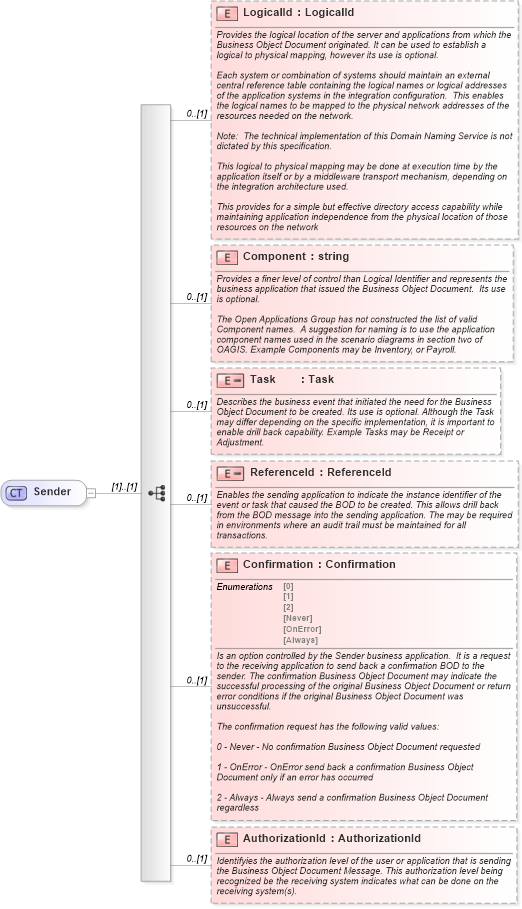
<xs:complexType name="Sender">
    <xs:sequence>
        <xs:element name="LogicalId" type="LogicalId" minOccurs="0">
            <xs:annotation>
                <xs:documentation source="http://www.openapplications.org/oagis">Provides the logical location of the server and applications from which the Business Object Document originated. It can be used to establish a logical to physical mapping, however its use is optional.

Each system or combination of systems should maintain an external central reference table containing the logical names or logical addresses of the application systems in the integration configuration.  This enables the logical names to be mapped to the physical network addresses of the resources needed on the network.

Note:  The technical implementation of this Domain Naming Service is not dictated by this specification.

This logical to physical mapping may be done at execution time by the application itself or by a middleware transport mechanism, depending on the integration architecture used.

This provides for a simple but effective directory access capability while maintaining application independence from the physical location of those resources on the network</xs:documentation>
            </xs:annotation>
        </xs:element>
        <xs:element name="Component" type="xs:string" minOccurs="0">
            <xs:annotation>
                <xs:documentation source="http://www.openapplications.org/oagis">Provides a finer level of control than Logical Identifier and represents the business application that issued the Business Object Document.  Its use is optional.

The Open Applications Group has not constructed the list of valid Component names.  A suggestion for naming is to use the application component names used in the scenario diagrams in section two of OAGIS. Example Components may be Inventory, or Payroll.</xs:documentation>
            </xs:annotation>
        </xs:element>
        <xs:element name="Task" minOccurs="0">
            <xs:annotation>
                <xs:documentation source="http://www.openapplications.org/oagis">Describes the business event that initiated the need for the Business Object Document to be created. Its use is optional. Although the Task may differ depending on the specific implementation, it is important to enable drill back capability. Example Tasks may be Receipt or Adjustment.</xs:documentation>
            </xs:annotation>
            <xs:simpleType>
                <xs:restriction base="Task" />
            </xs:simpleType>
        </xs:element>
        <xs:element name="ReferenceId" minOccurs="0">
            <xs:annotation>
                <xs:documentation source="http://www.openapplications.org/oagis">Enables the sending application to indicate the instance identifier of the event or task that caused the BOD to be created. This allows drill back from the BOD message into the sending application. The may be required in environments where an audit trail must be maintained for all transactions.</xs:documentation>
            </xs:annotation>
            <xs:simpleType>
                <xs:restriction base="ReferenceId" />
            </xs:simpleType>
        </xs:element>
        <xs:element name="Confirmation" type="Confirmation" minOccurs="0">
            <xs:annotation>
                <xs:documentation source="http://www.openapplications.org/oagis">Is an option controlled by the Sender business application.  It is a request to the receiving application to send back a confirmation BOD to the sender. The confirmation Business Object Document may indicate the successful processing of the original Business Object Document or return error conditions if the original Business Object Document was unsuccessful.

The confirmation request has the following valid values:

0 - Never - No confirmation Business Object Document requested

1 - OnError - OnError send back a confirmation Business Object Document only if an error has occurred

2 - Always - Always send a confirmation Business Object Document regardless</xs:documentation>
            </xs:annotation>
        </xs:element>
        <xs:element name="AuthorizationId" type="AuthorizationId" minOccurs="0">
            <xs:annotation>
                <xs:documentation source="http://www.openapplications.org/oagis">Identifyies the authorization level of the user or application that is sending the Business Object Document Message. This authorization level being recognized be the receiving system indicates what can be done on the receiving system(s).</xs:documentation>
            </xs:annotation>
        </xs:element>
    </xs:sequence>
</xs:complexType>
|
 XSD Schema Diagram: