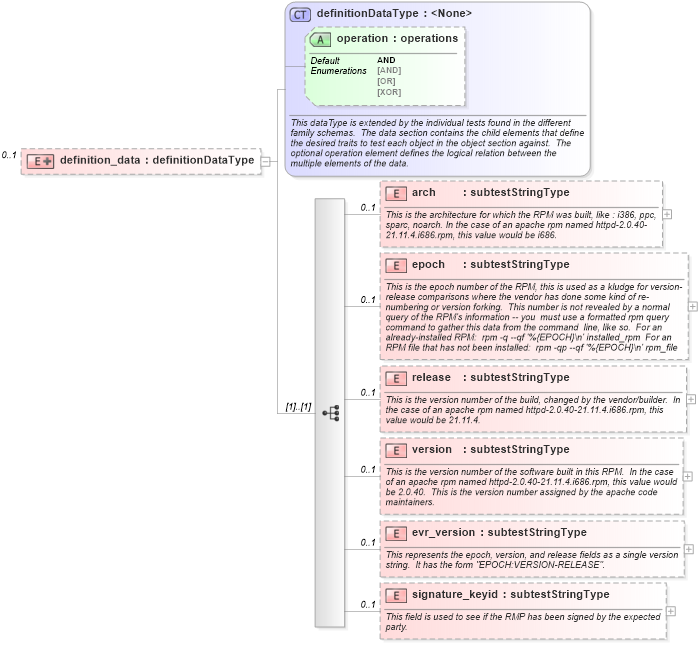
<xsd:element name="definition_data" minOccurs="0" maxOccurs="1">
    <xsd:complexType>
        <xsd:complexContent>
            <xsd:extension base="oval_results:definitionDataType">
                <xsd:sequence>
                    <xsd:element name="arch" type="oval_results:subtestStringType" minOccurs="0" maxOccurs="1">
                        <xsd:annotation>
                            <xsd:documentation>This is the architecture for which the RPM was built, like : i386, ppc, sparc, noarch. In the case of an apache rpm named httpd-2.0.40-21.11.4.i686.rpm, this value would be i686.</xsd:documentation>
                            <xsd:appinfo>
                                <parent_test>RPM Info Test</parent_test>
                                <cardinality>0-1</cardinality>
                                <content>string</content>
                                <valid_datatypes>string</valid_datatypes>
                                <valid_operators>equals, not equal, pattern match</valid_operators>
                            </xsd:appinfo>
                        </xsd:annotation>
                    </xsd:element>
                    <xsd:element name="epoch" type="oval_results:subtestStringType" minOccurs="0" maxOccurs="1">
                        <xsd:annotation>
                            <xsd:documentation>This is the epoch number of the RPM, this is used as a kludge for version-release comparisons where the vendor has done some kind of re-numbering or version forking.  This number is not revealed by a normal query of the RPM's information -- you  must use a formatted rpm query command to gather this data from the command  line, like so.  For an already-installed RPM:  rpm -q --qf '%{EPOCH}\n' installed_rpm  For an RPM file that has not been installed:  rpm -qp --qf '%{EPOCH}\n' rpm_file</xsd:documentation>
                            <xsd:appinfo>
                                <parent_test>RPM Info Test</parent_test>
                                <cardinality>0-1</cardinality>
                                <content>string</content>
                                <valid_datatypes>string</valid_datatypes>
                                <valid_operators>equals, not equal, pattern match</valid_operators>
                            </xsd:appinfo>
                        </xsd:annotation>
                    </xsd:element>
                    <xsd:element name="release" type="oval_results:subtestStringType" minOccurs="0" maxOccurs="1">
                        <xsd:annotation>
                            <xsd:documentation>This is the version number of the build, changed by the vendor/builder.  In the case of an apache rpm named httpd-2.0.40-21.11.4.i686.rpm, this value would be 21.11.4.</xsd:documentation>
                            <xsd:appinfo>
                                <parent_test>RPM Info Test</parent_test>
                                <cardinality>0-1</cardinality>
                                <content>string</content>
                                <valid_datatypes>string</valid_datatypes>
                                <valid_operators>equals, not equal, pattern match</valid_operators>
                            </xsd:appinfo>
                        </xsd:annotation>
                    </xsd:element>
                    <xsd:element name="version" type="oval_results:subtestStringType" minOccurs="0" maxOccurs="1">
                        <xsd:annotation>
                            <xsd:documentation>This is the version number of the software built in this RPM.  In the case of an apache rpm named httpd-2.0.40-21.11.4.i686.rpm, this value would be 2.0.40.  This is the version number assigned by the apache code maintainers.</xsd:documentation>
                            <xsd:appinfo>
                                <parent_test>RPM Info Test</parent_test>
                                <cardinality>0-1</cardinality>
                                <content>string</content>
                                <valid_datatypes>string</valid_datatypes>
                                <valid_operators>equals, not equal, pattern match</valid_operators>
                            </xsd:appinfo>
                        </xsd:annotation>
                    </xsd:element>
                    <xsd:element name="evr_version" type="oval_results:subtestStringType" minOccurs="0" maxOccurs="1">
                        <xsd:annotation>
                            <xsd:documentation>This represents the epoch, version, and release fields as a single version string.  It has the form "EPOCH:VERSION-RELEASE".</xsd:documentation>
                            <xsd:appinfo>
                                <parent_test>RPM Info Test</parent_test>
                                <cardinality>0-1</cardinality>
                                <content>string</content>
                                <valid_datatypes>string</valid_datatypes>
                                <valid_operators>equals, not equal, greater than, less than, greater than or equal, less than or equal, pattern match</valid_operators>
                            </xsd:appinfo>
                        </xsd:annotation>
                    </xsd:element>
                    <xsd:element name="signature_keyid" type="oval_results:subtestStringType" minOccurs="0" maxOccurs="1">
                        <xsd:annotation>
                            <xsd:documentation>This field is used to see if the RMP has been signed by the expected party.</xsd:documentation>
                            <xsd:appinfo>
                                <parent_test>RPM Info Test</parent_test>
                                <cardinality>0-1</cardinality>
                                <content>string</content>
                                <valid_datatypes>string</valid_datatypes>
                                <valid_operators>equals, not equal, pattern match</valid_operators>
                            </xsd:appinfo>
                        </xsd:annotation>
                    </xsd:element>
                </xsd:sequence>
            </xsd:extension>
        </xsd:complexContent>
    </xsd:complexType>
</xsd:element>
|
 XSD Schema Diagram: