<xsd:simpleType name="OperationEnumeration">
    <xsd:annotation>
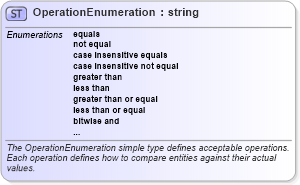
        <xsd:documentation>The OperationEnumeration simple type defines acceptable operations. Each operation defines how to compare entities against their actual values.</xsd:documentation>
    </xsd:annotation>
    <xsd:restriction base="xsd:string">
        <xsd:enumeration value="equals">
            <xsd:annotation>
                <xsd:documentation>The 'equals' operation returns true if the actual value on the system is equal to the stated entity.  When the specified datatype is a string, this results in a case-sensitive comparison.</xsd:documentation>
            </xsd:annotation>
        </xsd:enumeration>
        <xsd:enumeration value="not equal">
            <xsd:annotation>
                <xsd:documentation>The 'not equal' operation returns true if the actual value on the system is not equal to the stated entity.  When the specified datatype is a string, this results in a case-sensitive comparison.</xsd:documentation>
            </xsd:annotation>
        </xsd:enumeration>
        <xsd:enumeration value="case insensitive equals">
            <xsd:annotation>
                <xsd:documentation>The 'case insensitive equals' operation is meant for string data and returns true if the actual value on the system is equal (using a case insensitive comparison) to the stated entity.</xsd:documentation>
            </xsd:annotation>
        </xsd:enumeration>
        <xsd:enumeration value="case insensitive not equal">
            <xsd:annotation>
                <xsd:documentation>The 'case insensitive not equal' operation is meant for string data and returns true if the actual value on the system is not equal (using a case insensitive comparison) to the stated entity.</xsd:documentation>
            </xsd:annotation>
        </xsd:enumeration>
        <xsd:enumeration value="greater than">
            <xsd:annotation>
                <xsd:documentation>The 'greater than' operation returns true if the actual value on the system is greater than the stated entity.</xsd:documentation>
            </xsd:annotation>
        </xsd:enumeration>
        <xsd:enumeration value="less than">
            <xsd:annotation>
                <xsd:documentation>The 'less than' operation returns true if the actual value on the system is less than the stated entity.</xsd:documentation>
            </xsd:annotation>
        </xsd:enumeration>
        <xsd:enumeration value="greater than or equal">
            <xsd:annotation>
                <xsd:documentation>The 'greater than or equal' operation returns true if the actual value on the system is greater than or equal to the stated entity.</xsd:documentation>
            </xsd:annotation>
        </xsd:enumeration>
        <xsd:enumeration value="less than or equal">
            <xsd:annotation>
                <xsd:documentation>The 'less than or equal' operation returns true if the actual value on the system is less than or equal to the stated entity.</xsd:documentation>
            </xsd:annotation>
        </xsd:enumeration>
        <xsd:enumeration value="bitwise and">
            <xsd:annotation>
                <xsd:documentation>The 'bitwise and' operation is used to determine if a specific bit is set. It returns true if performing a BITWISE AND with the binary representation of the stated entity against the binary representation of the actual value on the system results in a binary value that is equal to the binary representation of the stated entity. For example, assuming a datatype of 'int', if the actual integer value of the setting on your machine is 6 (same as 0110 in binary), then performing a 'bitwise and' with the stated integer 4 (0100) returns 4 (0100). Since the result is the same as the state mask, then the test returns true. If the actual value on your machine is 1 (0001), then the 'bitwise and' with the stated integer 4 (0100) returns 0 (0000). Since the result is not the same as the stated mask, then the test fails.</xsd:documentation>
            </xsd:annotation>
        </xsd:enumeration>
        <xsd:enumeration value="bitwise or">
            <xsd:annotation>
                <xsd:documentation>The 'bitwise or' operation is used to determine if a specific bit is not set. It returns true if performing a BITWISE OR with the binary representation of the stated entity against the binary representation of the actual value on the system results in a binary value that is equal to the binary representation of the stated entity. For example, assuming a datatype of 'int', if the actual integer value of the setting on your machine is 6 (same as 0110 in binary), then performing a 'bitwise or' with the stated integer 14 (1110) returns 14 (1110). Since the result is the same as the state mask, then the test returns true. If the actual value on your machine is 1 (0001), then the 'bitwise or' with the stated integer 14 (1110) returns 15 (1111). Since the result is not the same as the stated mask, then the test fails.</xsd:documentation>
            </xsd:annotation>
        </xsd:enumeration>
        <xsd:enumeration value="pattern match">
            <xsd:annotation>
                <xsd:documentation>The 'pattern match' operation allows an item to be tested against a regular expression. When used by an entity in an OVAL Object, the regular expression represents the set of matching objects on the system. Patterns must comply with POSIX std 1003.2-1992, Section 2.8 - 'Regular Expression Notation'. Patterns can use both Basic and Extended Regular Expression notation.</xsd:documentation>
            </xsd:annotation>
        </xsd:enumeration>
    </xsd:restriction>
</xsd:simpleType>
|
 XSD Schema Diagram:
 Facets: