Definition Type: Element
Name: LoadMatchDocument
Namespace: http://www.openapplications.org/oagis/9
Type: nsA:LoadMatchDocumentType
Containing Schema: LoadMatchDocument.xsd
Abstract
Documentation:
In certain application suites, purchase order / invoice matching functionality exists in the purchasing application, while in other suites this functionality exists in the accounts payable application. The invoice matching process may include several document types, including the following: Two way match - Purchase Order and the Invoice Three way match - Purchase Order, Invoice, and the Receipt Four way match - Purchase Order, Invoice, Receipt, and Inspection results For the four way match, it is assumed that inspection results have been updated on the Purchase Order for visibility in matching. When matching takes place in the purchasing application, the accounts payable application may have to inform the purchasing application of the supplier invoice to which purchasing transactions (purchase orders, goods receiving notes and inspection tickets) are to be matched if the invoice is initially entered into the accounts payable application. Note that in some situations, invoices are entered directly into the purchase order application or are created by the purchase order application when using evaluated receipt settlement (ERS) and in this instance, it is not necessary to perform the separate integration described in these chapters. When matching takes place in the accounts payable application, the purchasing application must inform the accounts payable application of the purchasing transactions (purchase orders, goods receiving notes and inspection tickets) to which the invoice (in accounts payable) is to be matched. These integration scenarios have been developed for document matching to occur at the line level within the PuchaseOrder document and the Invoice document. This may be a one to one relationship, or it may be a many to one relationship from Invoice to PuchaseOrder or from the PuchaseOrder to the Invoice. Charges not associated with a specific Invoice line match be matched individually. The LoadMatchDocument is for use both by the accounts payable application and the purchasing application in exchanging the transactions that are required to be matched. Discussed in a later chapter are the UpdateMatchDocument. The purpose of UpdateMatchDocument is for the accounts payable application to send successful matching notification or a match fail.notification to a purchasing application.
Collapse XSD Schema Diagram:
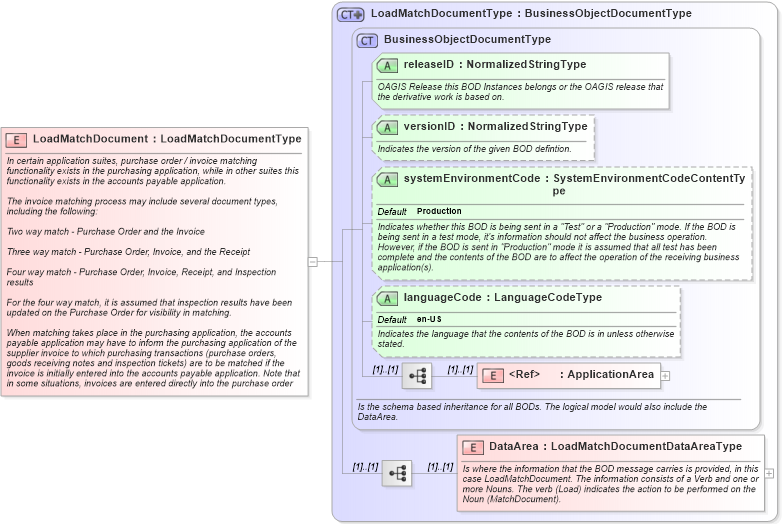
Drilldown into DataArea in schema loadmatchdocument_xsd Drilldown into ApplicationArea in schema meta_xsd Drilldown into languageCode in schema meta_xsd Drilldown into systemEnvironmentCode in schema meta_xsd Drilldown into versionID in schema meta_xsd Drilldown into releaseID in schema meta_xsd Drilldown into BusinessObjectDocumentType in schema meta_xsd Drilldown into LoadMatchDocumentType in schema loadmatchdocument_xsdXSD Diagram of LoadMatchDocument in schema loadmatchdocument_xsd (Open Applications Group (OAGIS))
Collapse XSD Schema Code:
<xsd:element name="LoadMatchDocument" type="LoadMatchDocumentType">
    <xsd:annotation>
        <xsd:documentation source="http://www.openapplications.org/oagis/9">In certain application suites, purchase order / invoice matching functionality exists in the purchasing application, while in other suites this functionality exists in the accounts payable application.

The invoice matching process may include several document types, including the following:

Two way match - Purchase Order and the Invoice 

Three way match - Purchase Order, Invoice, and the Receipt 

Four way match - Purchase Order, Invoice, Receipt, and Inspection results 

For the four way match, it is assumed that inspection results have been updated on the Purchase Order for visibility in matching.

When matching takes place in the purchasing application, the accounts payable application may have to inform the purchasing application of the supplier invoice to which purchasing transactions (purchase orders, goods receiving notes and inspection tickets) are to be matched if the invoice is initially entered into the accounts payable application. Note that in some situations, invoices are entered directly into the purchase order application or are created by the purchase order application when using evaluated receipt settlement (ERS) and in this instance, it is not necessary to perform the separate integration described in these chapters.

When matching takes place in the accounts payable application, the purchasing application must inform the accounts payable application of the purchasing transactions (purchase orders, goods receiving notes and inspection tickets) to which the invoice (in accounts payable) is to be matched. 

These integration scenarios have been developed for document matching to occur at the line level within the PuchaseOrder document and the Invoice document.  This may be a one to one relationship, or it may be a many to one relationship from Invoice to PuchaseOrder or from the PuchaseOrder to the Invoice.  Charges not associated with a specific Invoice line match be matched individually.

The LoadMatchDocument is for use both by the accounts payable application and the purchasing application in exchanging the transactions that are required to be matched.

Discussed in a later chapter are the UpdateMatchDocument.  The purpose of UpdateMatchDocument is for the accounts payable application to send successful matching notification or a match fail.notification to a purchasing application. </xsd:documentation>
    </xsd:annotation>
</xsd:element>
Collapse Child Elements:
Name Type Min Occurs Max Occurs
ApplicationArea nsA:ApplicationArea (1) (1)
DataArea nsA:DataArea (1) (1)
Collapse Child Attributes:
Name Type Default Value Use
releaseID nsA:releaseID Required
versionID nsA:versionID Optional
systemEnvironmentCode nsA:systemEnvironmentCode Production Optional
languageCode nsA:languageCode en-US Optional
Collapse Derivation Tree: