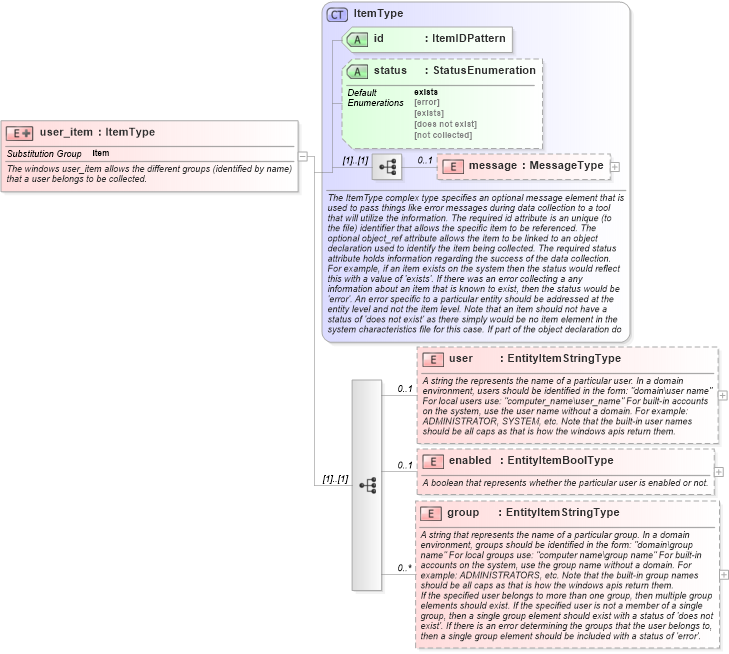
<xsd:element name="user_item" substitutionGroup="oval-sc:item">
    <xsd:annotation>
        <xsd:documentation>The windows user_item allows the different groups (identified by name) that a user belongs to be collected.</xsd:documentation>
    </xsd:annotation>
    <xsd:complexType>
        <xsd:complexContent>
            <xsd:extension base="oval-sc:ItemType">
                <xsd:sequence>
                    <xsd:element name="user" type="oval-sc:EntityItemStringType" minOccurs="0" maxOccurs="1">
                        <xsd:annotation>
                            <xsd:documentation>A string the represents the name of a particular user. In a domain environment, users should be identified in the form: "domain\user name" For local users use: "computer_name\user_name" For built-in accounts on the system, use the user name without a domain. For example: ADMINISTRATOR, SYSTEM, etc. Note that the built-in user names should be all caps as that is how the windows apis return them.</xsd:documentation>
                            <xsd:appinfo>
                                <sch:pattern id="useritemuser" xmlns:sch="http://purl.oclc.org/dsdl/schematron">
                                    <sch:rule context="win-sc:user_item/win-sc:user">
                                        <sch:assert test="not(@datatype) or @datatype='string'">item <sch:value-of select="../@id" /> - datatype attribute for the user entity of a user_item should be 'string'</sch:assert>
                                    </sch:rule>
                                </sch:pattern>
                            </xsd:appinfo>
                        </xsd:annotation>
                    </xsd:element>
                    <xsd:element name="enabled" type="oval-sc:EntityItemBoolType" minOccurs="0" maxOccurs="1">
                        <xsd:annotation>
                            <xsd:documentation>A boolean that represents whether the particular user is enabled or not.</xsd:documentation>
                            <xsd:appinfo>
                                <sch:pattern id="useritemenabled" xmlns:sch="http://purl.oclc.org/dsdl/schematron">
                                    <sch:rule context="win-sc:user_item/win-sc:enabled">
                                        <sch:assert test="@datatype='boolean'">item <sch:value-of select="../@id" /> - datatype attribute for the enabled entity of a user_item should be 'boolean'</sch:assert>
                                    </sch:rule>
                                </sch:pattern>
                            </xsd:appinfo>
                        </xsd:annotation>
                    </xsd:element>
                    <xsd:element name="group" type="oval-sc:EntityItemStringType" minOccurs="0" maxOccurs="unbounded">
                        <xsd:annotation>
                            <xsd:documentation>A string that represents the name of a particular group. In a domain environment, groups should be identified in the form: "domain\group name" For local groups use: "computer name\group name" For built-in accounts on the system, use the group name without a domain. For example: ADMINISTRATORS, etc. Note that the built-in group names should be all caps as that is how the windows apis return them.</xsd:documentation>
                            <xsd:documentation>If the specified user belongs to more than one group, then multiple group elements should exist. If the specified user is not a member of a single group, then a single group element should exist with a status of 'does not exist'. If there is an error determining the groups that the user belongs to, then a single group element should be included with a status of 'error'.</xsd:documentation>
                            <xsd:appinfo>
                                <sch:pattern id="useritemgroup" xmlns:sch="http://purl.oclc.org/dsdl/schematron">
                                    <sch:rule context="win-sc:user_item/win-sc:group">
                                        <sch:assert test="not(@datatype) or @datatype='string'">item <sch:value-of select="../@id" /> - datatype attribute for a group entity of a user_item should be 'string'</sch:assert>
                                    </sch:rule>
                                </sch:pattern>
                            </xsd:appinfo>
                        </xsd:annotation>
                    </xsd:element>
                </xsd:sequence>
            </xsd:extension>
        </xsd:complexContent>
    </xsd:complexType>
</xsd:element>
|
 XSD Schema Diagram: