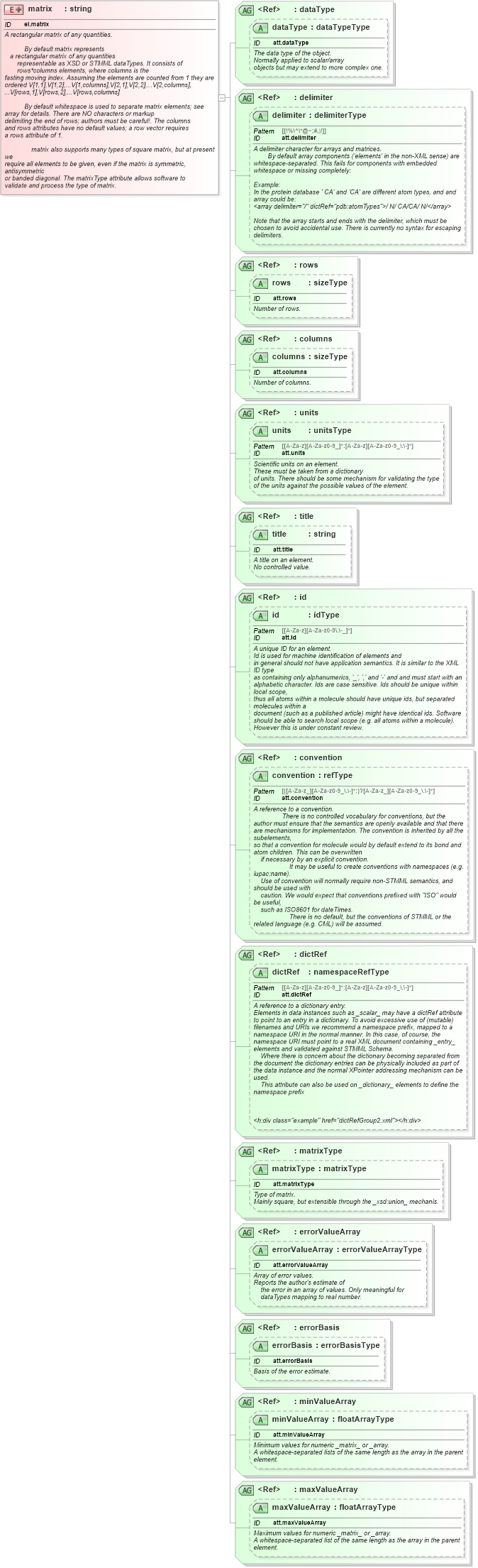
<xsd:element name="matrix" id="el.matrix">
    <xsd:annotation>
        <xsd:documentation>
            <h:div class="summary" xmlns:h="http://www.w3.org/1999/xhtml">A rectangular matrix of any quantities.</h:div>
            <h:div class="description" xmlns:h="http://www.w3.org/1999/xhtml">
                <h:p>By default <h:tt>matrix</h:tt> represents
        a rectangular matrix of any quantities
            representable as XSD or STMML dataTypes. It consists of
            <h:tt>rows*columns</h:tt> elements, where <h:tt>columns</h:tt> is the
     fasting moving index. Assuming the elements are counted from 1 they are
     ordered <h:tt>V[1,1],V[1,2],...V[1,columns],V[2,1],V[2,2],...V[2,columns],
     ...V[rows,1],V[rows,2],...V[rows,columns]</h:tt>
                </h:p>
                <h:p>By default whitespace is used to separate matrix elements; see
     <h:a href="el.array">array</h:a> for details. There are NO characters or markup
     delimiting the end of rows; authors must be careful!. The <h:tt>columns</h:tt>
     and <h:tt>rows</h:tt> attributes have no default values; a row vector requires
     a <h:tt>rows</h:tt> attribute of 1.</h:p>
                <h:p>
                    <h:tt>matrix</h:tt> also supports many types of square matrix, but at present we
     require all elements to be given, even if the matrix is symmetric, antisymmetric
     or banded diagonal. The <h:tt>matrixType</h:tt> attribute allows software to
     validate and process the type of matrix.</h:p>
            </h:div>
            <h:div class="example" href="matrix1.xml" xmlns:h="http://www.w3.org/1999/xhtml" />
        </xsd:documentation>
    </xsd:annotation>
    <xsd:complexType>
        <xsd:simpleContent>
            <xsd:extension base="xsd:string">
                <xsd:attributeGroup ref="dataType" />
                <xsd:attributeGroup ref="delimiter" />
                <xsd:attributeGroup ref="rows" />
                <xsd:attributeGroup ref="columns" />
                <xsd:attributeGroup ref="units" />
                <xsd:attributeGroup ref="title" />
                <xsd:attributeGroup ref="id" />
                <xsd:attributeGroup ref="convention" />
                <xsd:attributeGroup ref="dictRef" />
                <xsd:attributeGroup ref="matrixType" />
                <xsd:attributeGroup ref="errorValueArray" />
                <xsd:attributeGroup ref="errorBasis" />
                <xsd:attributeGroup ref="minValueArray" />
                <xsd:attributeGroup ref="maxValueArray" />
            </xsd:extension>
        </xsd:simpleContent>
    </xsd:complexType>
</xsd:element>
|
 XSD Schema Diagram: