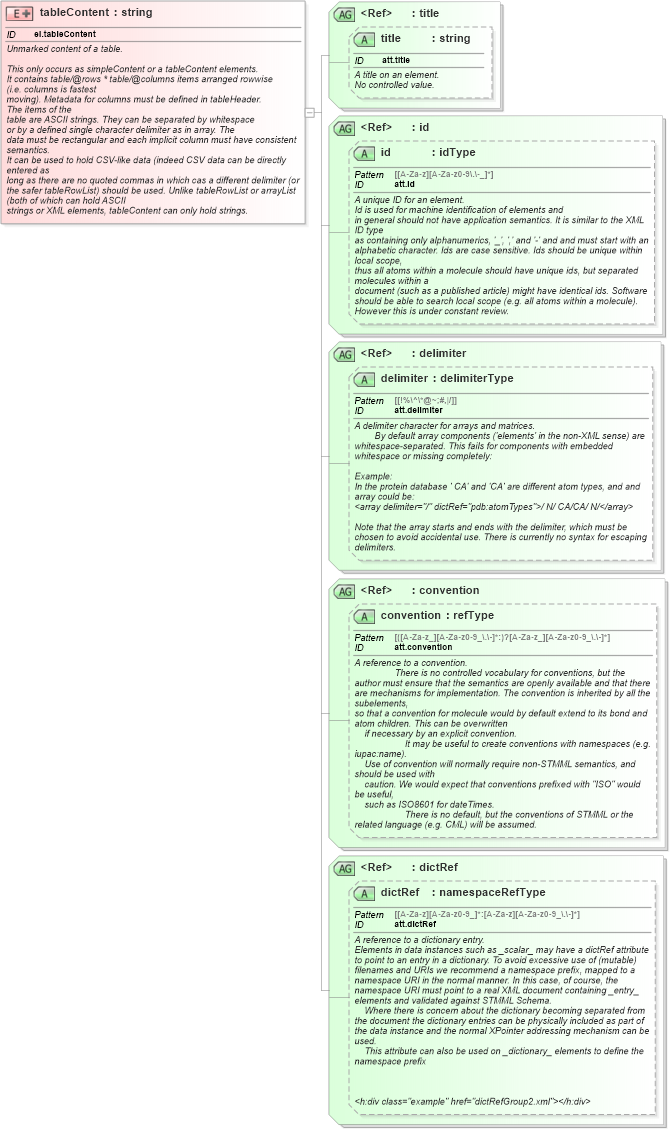
<xsd:element name="tableContent" id="el.tableContent">
    <xsd:annotation>
        <xsd:documentation>
            <h:div class="summary" xmlns:h="http://www.w3.org/1999/xhtml">Unmarked content of a table.</h:div>
            <h:div class="description" xmlns:h="http://www.w3.org/1999/xhtml">
                <h:p>This only occurs as simpleContent or a tableContent elements.
            It contains table/@rows * table/@columns items arranged rowwise
            (i.e. columns is fastest
            moving). Metadata for columns must be defined in tableHeader.
            The items of the
            table are ASCII strings. They can be separated by whitespace
            or by a defined single character delimiter as in <h:tt>array</h:tt>. The
            data must be rectangular and each implicit column must have consistent semantics.
            It can be used to hold CSV-like data (indeed CSV data can be directly entered as
            long as there are no quoted commas in which cas a different delimiter (or
            the safer tableRowList) should be used. Unlike tableRowList or arrayList (both of which can hold ASCII
            strings or XML elements, tableContent can only hold strings.
            </h:p>
            </h:div>
            <h:div class="example" href="table7.xml" xmlns:h="http://www.w3.org/1999/xhtml" />
        </xsd:documentation>
    </xsd:annotation>
    <xsd:complexType>
        <xsd:simpleContent>
            <xsd:extension base="xsd:string">
                <xsd:attributeGroup ref="title" />
                <xsd:attributeGroup ref="id" />
                <xsd:attributeGroup ref="delimiter" />
                <xsd:attributeGroup ref="convention" />
                <xsd:attributeGroup ref="dictRef" />
            </xsd:extension>
        </xsd:simpleContent>
    </xsd:complexType>
</xsd:element>
|
 XSD Schema Diagram: