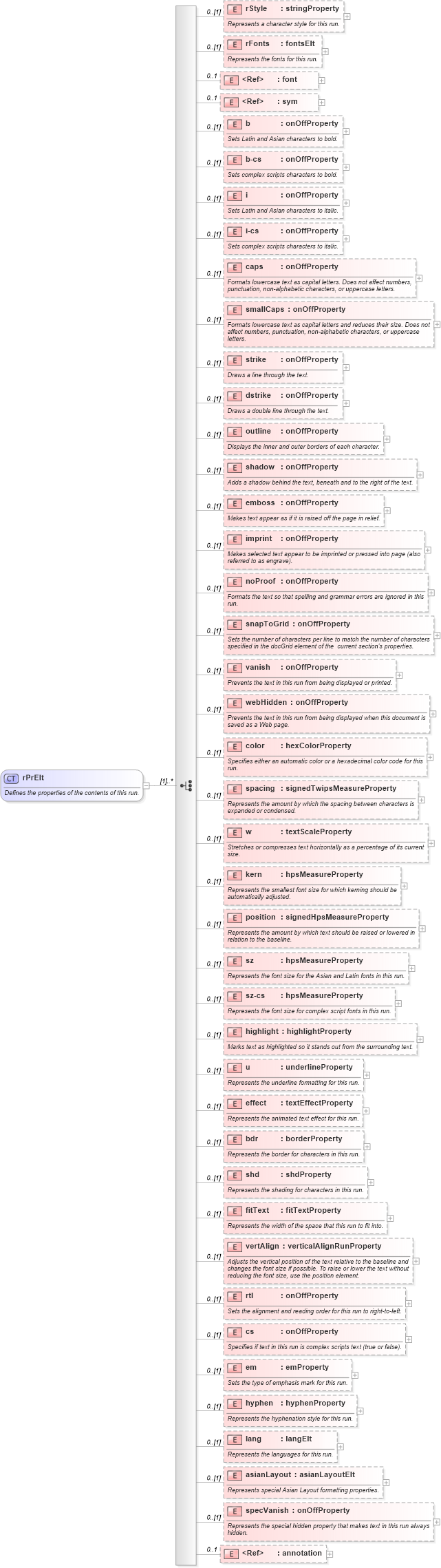
<xsd:complexType name="rPrElt">
    <xsd:annotation>
        <xsd:documentation>Defines the properties of the contents of this run.</xsd:documentation>
    </xsd:annotation>
    <xsd:choice maxOccurs="unbounded">
        <xsd:element name="rStyle" type="stringProperty" minOccurs="0">
            <xsd:annotation>
                <xsd:documentation>Represents a character style for this run.</xsd:documentation>
            </xsd:annotation>
        </xsd:element>
        <xsd:element name="rFonts" type="fontsElt" minOccurs="0">
            <xsd:annotation>
                <xsd:documentation>Represents the fonts for this run.</xsd:documentation>
            </xsd:annotation>
        </xsd:element>
        <xsd:element ref="wx:font" minOccurs="0" maxOccurs="1">
            <xsd:annotation>
                <xsd:documentation>Hint as to which Font Word used to display this run.</xsd:documentation>
            </xsd:annotation>
        </xsd:element>
        <xsd:element ref="wx:sym" minOccurs="0" maxOccurs="1">
            <xsd:annotation>
                <xsd:documentation>Hint that this run resolves this single symbol.</xsd:documentation>
            </xsd:annotation>
        </xsd:element>
        <xsd:element name="b" type="onOffProperty" minOccurs="0">
            <xsd:annotation>
                <xsd:documentation>Sets Latin and Asian characters to bold.</xsd:documentation>
            </xsd:annotation>
        </xsd:element>
        <xsd:element name="b-cs" type="onOffProperty" minOccurs="0">
            <xsd:annotation>
                <xsd:documentation>Sets complex scripts characters to bold.</xsd:documentation>
            </xsd:annotation>
        </xsd:element>
        <xsd:element name="i" type="onOffProperty" minOccurs="0">
            <xsd:annotation>
                <xsd:documentation>Sets Latin and Asian characters to italic.</xsd:documentation>
            </xsd:annotation>
        </xsd:element>
        <xsd:element name="i-cs" type="onOffProperty" minOccurs="0">
            <xsd:annotation>
                <xsd:documentation>Sets complex scripts characters to italic.</xsd:documentation>
            </xsd:annotation>
        </xsd:element>
        <xsd:element name="caps" type="onOffProperty" minOccurs="0">
            <xsd:annotation>
                <xsd:documentation>Formats lowercase text as capital letters. Does not affect numbers, punctuation, non-alphabetic characters, or uppercase letters.</xsd:documentation>
            </xsd:annotation>
        </xsd:element>
        <xsd:element name="smallCaps" type="onOffProperty" minOccurs="0">
            <xsd:annotation>
                <xsd:documentation>Formats lowercase text as capital letters and reduces their size. Does not affect numbers, punctuation, non-alphabetic characters, or uppercase letters.</xsd:documentation>
            </xsd:annotation>
        </xsd:element>
        <xsd:element name="strike" type="onOffProperty" minOccurs="0">
            <xsd:annotation>
                <xsd:documentation>Draws a line through the text.</xsd:documentation>
            </xsd:annotation>
        </xsd:element>
        <xsd:element name="dstrike" type="onOffProperty" minOccurs="0">
            <xsd:annotation>
                <xsd:documentation>Draws a double line through the text.</xsd:documentation>
            </xsd:annotation>
        </xsd:element>
        <xsd:element name="outline" type="onOffProperty" minOccurs="0">
            <xsd:annotation>
                <xsd:documentation>Displays the inner and outer borders of each character.</xsd:documentation>
            </xsd:annotation>
        </xsd:element>
        <xsd:element name="shadow" type="onOffProperty" minOccurs="0">
            <xsd:annotation>
                <xsd:documentation>Adds a shadow behind the text, beneath and to the right of the text.</xsd:documentation>
            </xsd:annotation>
        </xsd:element>
        <xsd:element name="emboss" type="onOffProperty" minOccurs="0">
            <xsd:annotation>
                <xsd:documentation>Makes text appear as if it is raised off the page in relief.</xsd:documentation>
            </xsd:annotation>
        </xsd:element>
        <xsd:element name="imprint" type="onOffProperty" minOccurs="0">
            <xsd:annotation>
                <xsd:documentation>Makes selected text appear to be imprinted or pressed into page (also referred to as engrave).</xsd:documentation>
            </xsd:annotation>
        </xsd:element>
        <xsd:element name="noProof" type="onOffProperty" minOccurs="0">
            <xsd:annotation>
                <xsd:documentation>Formats the text so that spelling and grammar errors are ignored in this run.</xsd:documentation>
            </xsd:annotation>
        </xsd:element>
        <xsd:element name="snapToGrid" type="onOffProperty" minOccurs="0">
            <xsd:annotation>
                <xsd:documentation>Sets the number of characters per line to match the number of characters specified in the docGrid element of the  current section's properties.</xsd:documentation>
            </xsd:annotation>
        </xsd:element>
        <xsd:element name="vanish" type="onOffProperty" minOccurs="0">
            <xsd:annotation>
                <xsd:documentation>Prevents the text in this run from being displayed or printed.</xsd:documentation>
            </xsd:annotation>
        </xsd:element>
        <xsd:element name="webHidden" type="onOffProperty" minOccurs="0">
            <xsd:annotation>
                <xsd:documentation>Prevents the text in this run from being displayed when this document is saved as a Web page.</xsd:documentation>
            </xsd:annotation>
        </xsd:element>
        <xsd:element name="color" type="hexColorProperty" minOccurs="0">
            <xsd:annotation>
                <xsd:documentation>Specifies either an automatic color or a hexadecimal color code for this run.</xsd:documentation>
            </xsd:annotation>
        </xsd:element>
        <xsd:element name="spacing" type="signedTwipsMeasureProperty" minOccurs="0">
            <xsd:annotation>
                <xsd:documentation>Represents the amount by which the spacing between characters is expanded or condensed.</xsd:documentation>
            </xsd:annotation>
        </xsd:element>
        <xsd:element name="w" type="textScaleProperty" minOccurs="0">
            <xsd:annotation>
                <xsd:documentation>Stretches or compresses text horizontally as a percentage of its current size.</xsd:documentation>
            </xsd:annotation>
        </xsd:element>
        <xsd:element name="kern" type="hpsMeasureProperty" minOccurs="0">
            <xsd:annotation>
                <xsd:documentation>Represents the smallest font size for which kerning should be automatically adjusted.</xsd:documentation>
            </xsd:annotation>
        </xsd:element>
        <xsd:element name="position" type="signedHpsMeasureProperty" minOccurs="0">
            <xsd:annotation>
                <xsd:documentation>Represents the amount by which text should be raised or lowered in relation to the baseline.</xsd:documentation>
            </xsd:annotation>
        </xsd:element>
        <xsd:element name="sz" type="hpsMeasureProperty" minOccurs="0">
            <xsd:annotation>
                <xsd:documentation>Represents the font size for the Asian and Latin fonts in this run.</xsd:documentation>
            </xsd:annotation>
        </xsd:element>
        <xsd:element name="sz-cs" type="hpsMeasureProperty" minOccurs="0">
            <xsd:annotation>
                <xsd:documentation>Represents the font size for complex script fonts in this run.</xsd:documentation>
            </xsd:annotation>
        </xsd:element>
        <xsd:element name="highlight" type="highlightProperty" minOccurs="0">
            <xsd:annotation>
                <xsd:documentation>Marks text as highlighted so it stands out from the surrounding text.</xsd:documentation>
            </xsd:annotation>
        </xsd:element>
        <xsd:element name="u" type="underlineProperty" minOccurs="0">
            <xsd:annotation>
                <xsd:documentation>Represents the underline formatting for this run.</xsd:documentation>
            </xsd:annotation>
        </xsd:element>
        <xsd:element name="effect" type="textEffectProperty" minOccurs="0">
            <xsd:annotation>
                <xsd:documentation>Represents the animated text effect for this run.</xsd:documentation>
            </xsd:annotation>
        </xsd:element>
        <xsd:element name="bdr" type="borderProperty" minOccurs="0">
            <xsd:annotation>
                <xsd:documentation>Represents the border for characters in this run.</xsd:documentation>
            </xsd:annotation>
        </xsd:element>
        <xsd:element name="shd" type="shdProperty" minOccurs="0">
            <xsd:annotation>
                <xsd:documentation>Represents the shading for characters in this run.</xsd:documentation>
            </xsd:annotation>
        </xsd:element>
        <xsd:element name="fitText" type="fitTextProperty" minOccurs="0">
            <xsd:annotation>
                <xsd:documentation>Represents the width of the space that this run to fit into.</xsd:documentation>
            </xsd:annotation>
        </xsd:element>
        <xsd:element name="vertAlign" type="verticalAlignRunProperty" minOccurs="0">
            <xsd:annotation>
                <xsd:documentation>Adjusts the vertical position of the text relative to the baseline and changes the font size if possible. To raise or lower the text without reducing the font size, use the position element.</xsd:documentation>
            </xsd:annotation>
        </xsd:element>
        <xsd:element name="rtl" type="onOffProperty" minOccurs="0">
            <xsd:annotation>
                <xsd:documentation>Sets the alignment and reading order for this run to right-to-left.</xsd:documentation>
            </xsd:annotation>
        </xsd:element>
        <xsd:element name="cs" type="onOffProperty" minOccurs="0">
            <xsd:annotation>
                <xsd:documentation>Specifies if text in this run is complex scripts text (true or false).</xsd:documentation>
            </xsd:annotation>
        </xsd:element>
        <xsd:element name="em" type="emProperty" minOccurs="0">
            <xsd:annotation>
                <xsd:documentation>Sets the type of emphasis mark for this run.</xsd:documentation>
            </xsd:annotation>
        </xsd:element>
        <xsd:element name="hyphen" type="hyphenProperty" minOccurs="0">
            <xsd:annotation>
                <xsd:documentation>Represents the hyphenation style for this run.</xsd:documentation>
            </xsd:annotation>
        </xsd:element>
        <xsd:element name="lang" type="langElt" minOccurs="0">
            <xsd:annotation>
                <xsd:documentation>Represents the languages for this run.</xsd:documentation>
            </xsd:annotation>
        </xsd:element>
        <xsd:element name="asianLayout" type="asianLayoutElt" minOccurs="0">
            <xsd:annotation>
                <xsd:documentation>Represents special Asian Layout formatting properties.</xsd:documentation>
            </xsd:annotation>
        </xsd:element>
        <xsd:element name="specVanish" type="onOffProperty" minOccurs="0">
            <xsd:annotation>
                <xsd:documentation>Represents the special hidden property that makes text in this run always hidden.</xsd:documentation>
            </xsd:annotation>
        </xsd:element>
        <xsd:element ref="aml:annotation" minOccurs="0" maxOccurs="1">
            <xsd:annotation>
                <xsd:documentation>Revision marking of run properties.</xsd:documentation>
            </xsd:annotation>
        </xsd:element>
    </xsd:choice>
</xsd:complexType>
|
 XSD Schema Diagram: